Google Ads for Beauty and Skincare Brands: Shopping, PMax, and Search That Actually Converts
Google captures beauty shoppers at their highest purchase intent. When someone types 'vitamin C serum for dry skin' or 'best tinted moisturizer SPF', they have already decided to buy - they are just picking the brand. To understand how Google and Meta complement each other for beauty brands, our Meta Ads benchmarks for skincare and beauty show how ROAS splits across channels. For brands that also carry supplement or wellness products, the same high-intent logic applies — see our guide to Meta ads for supplement brands for the channel-specific differences.
Meta builds awareness. Google closes the deal. For beauty and skincare brands, both channels play a role, but they play different roles - and treating Google the same way you treat Meta is one of the most common (and costly) mistakes we see.
This guide covers how we structure Google Ads for beauty and skincare brands: what campaigns to run, how to set up your product feed, how PMax fits in, and what we actually see across our client base.
Key Takeaways
- •Google Ads captures high-intent buyers who are already searching for what you sell - Meta cannot replicate this signal
- •PMax is the default starting point for most beauty brands in 2026, but it needs a quality product feed to work
- •Product feed quality drives the majority of Shopping performance - before any campaign optimization
- •Search campaigns protect your brand name and capture high-value queries that Shopping misses
- •Never judge Google by ROAS alone - use MER as your primary health metric
Why Google Works Differently for Beauty Brands
On Meta, you show someone an ad for a serum they did not know they needed. On Google, they are already looking for that serum. That is a fundamentally different buyer - and it changes everything about how you structure your campaigns.
Google traffic from beauty product searches converts at a higher rate than Meta traffic, because the intent is already there. The challenge is not creating desire - it is showing up when desire already exists.
For beauty and skincare brands specifically, Google Shopping is powerful because: skincare shoppers actively compare products, read ingredients, and research before buying. The category has high volumes of specific long-tail searches - 'retinol serum for sensitive skin', 'niacinamide oil-free moisturizer' - that Shopping campaigns can capture profitably. And repeat purchase behaviour means a new customer acquired at break-even on the first order is still profitable over a 12-month window.
Across our beauty and skincare clients, Google Ads typically drives 25-40% of total paid revenue - with a higher average order value than Meta traffic, because the buyer was already in purchase mode.
That said, Google and Meta are complementary. A brand that only runs Google misses a large pool of unaware buyers. A brand that only runs Meta loses out on shoppers who search for the category and never find them.
Shopping Campaigns: Where Most Beauty Brands Should Start
Google Shopping is the visual product listing format at the top of search results when someone searches for a product category. For most beauty brands, this is the first Google campaign we recommend.
Shopping campaigns pull directly from your Google Merchant Center product feed. The quality of your feed is the single biggest lever in Shopping performance. We have seen brands double their Shopping revenue purely by improving their product feed - before touching any campaign settings.
Product titles
Google uses your product title to match your listing to search queries. A title like 'Vitamin C Serum - 30ml' is weaker than 'Vitamin C Brightening Serum for Dull Skin 30ml - Vegan Formula'. Include: product type, skin concern, key ingredient, size, and differentiating feature.
Product descriptions
Descriptions do not show in the Shopping ad itself, but they contribute to query matching. Include skin type, texture, key ingredients, what it does, and who it is for. Do not duplicate the title - add information.
Product images
White background product images are required for Shopping. Clean, high-resolution product shots with clear labels visible perform best. You can test lifestyle images via Performance Max asset groups - Shopping specifically needs product-on-white.
Custom labels
Use custom labels to segment by margin, bestseller status, and product category (cleanser, serum, SPF, moisturizer). This lets you adjust bids and budgets by segment rather than treating all products equally.
Not sure if your product feed is holding back your Shopping performance? Book a free Google Ads audit - we review feed quality, campaign structure, and conversion setup at no cost.
Performance Max for Beauty and Skincare Brands
Performance Max (PMax) is Google's all-in-one campaign type that serves across Shopping, Search, Display, YouTube, Discover, and Gmail from a single campaign. In 2026, PMax is the campaign type Google pushes hardest for ecommerce brands - including beauty.
PMax works by taking your product feed, creative assets (images, headlines, descriptions, videos), and audience signals, then letting Google's AI find buyers across all its surfaces.
When PMax works well for beauty brands: your product feed is strong; your asset groups have varied images and headlines; you have audience signals from existing customer data; conversion tracking passes purchase value accurately.
When PMax underperforms: feed quality is poor; asset groups are thin or generic; conversion tracking is incomplete; the account has fewer than 30-50 monthly conversions for the algorithm to learn from.
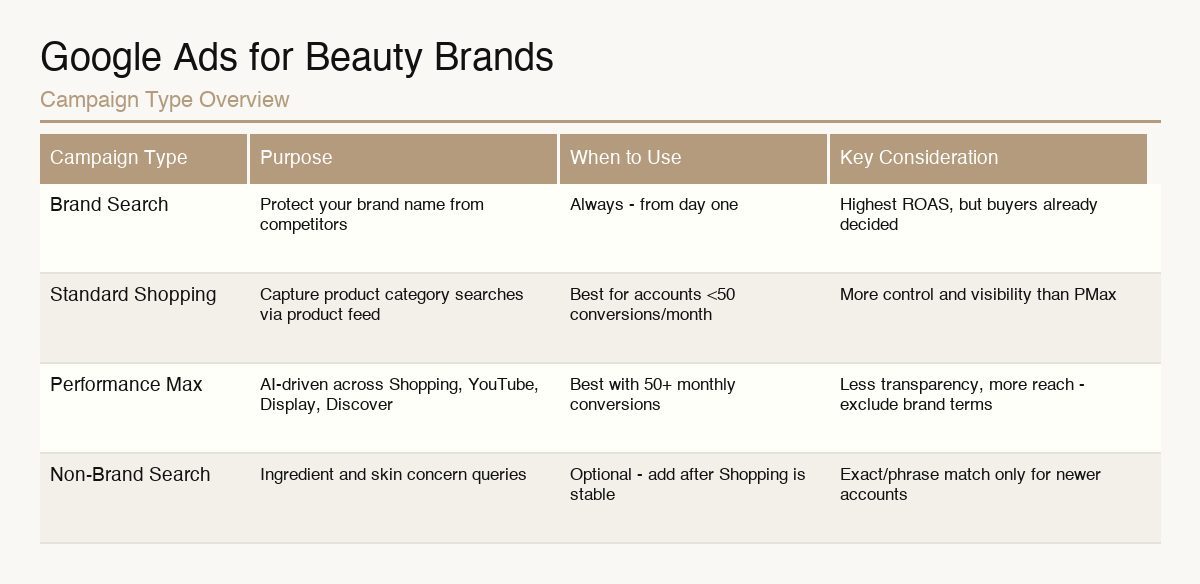
In our experience, PMax performs best for beauty brands with at least 50 conversions per month. Below that threshold, Standard Shopping often delivers more predictable results - the algorithm simply does not have enough data to optimize well.
One PMax reality worth knowing: you have limited visibility into where your spend goes. PMax does not give you search term reports the way Search campaigns do. You get Google's full network and AI, but you give up control and transparency. This is a real tradeoff worth knowing before you commit your full budget to it.
Our standard approach: run PMax as the primary campaign for broad coverage, with a brand-exclusion list to push branded searches to a separate branded Search campaign.
Standard Shopping vs. PMax: Which One to Run
This is one of the most common questions from beauty brand founders starting with Google Ads.
Start with Standard Shopping if: your account is new or generating fewer than 30-50 conversions per month; you want visibility into search terms and product-level performance; you are managing a tight budget and want more control over where it goes.
Move to (or add) PMax if: you have conversion history and the algorithm has data to learn from; you want to expand beyond Shopping into YouTube, Discover, and Display; you are scaling budgets and want Google's AI to find incremental buyers.
We often run both simultaneously: Standard Shopping for core bestsellers with high margin, PMax for broader coverage and growth. This gives control where it matters and scale where we want it.
Search Campaigns: Brand + High-Intent Keywords
Shopping captures category searches. Search campaigns capture specific intent - and they are essential for two reasons.
Brand campaigns (always run these)
A brand campaign bids on your own brand name. Without it, competitors can - and often do - show up when someone searches for you directly. Brand campaigns are cheap (you have the highest Quality Score for your own brand name) and high-intent. They typically deliver the best ROAS in any Google account - but do not let that inflate your overall performance picture. These buyers would often have found you anyway.
High-intent non-brand keywords
Beyond brand, there is a set of high-value queries worth targeting via Search. For beauty brands: category and skin concern queries ('serum for acne-prone skin', 'moisturizer for dry sensitive skin'); ingredient searches ('retinol cream', 'hyaluronic acid serum'); competitor terms, carefully evaluated on CPA before scaling.
Use exact match and phrase match for Search. Broad match can work in mature accounts with strong conversion history, but for newer beauty brands it tends to burn budget on irrelevant queries.
For beauty brands we manage, brand Search campaigns typically account for 15-25% of Google budget but deliver 30-40% of Google revenue - because the buyer is already decided. We always separate brand from non-brand campaigns to see true acquisition economics.
Product Feed and Merchant Center: The Foundation
Before any campaign optimization, your Merchant Center and product feed need to be clean. This is the infrastructure everything else runs on.
Common Merchant Center issues for beauty brands:
• Missing or incorrect GTIN (barcode) data - Google requires this for most products
• Disapproved products due to misrepresentation policy (claims like 'clinically proven' without proper substantiation can trigger reviews)
• Incorrect product categories - beauty products need precise Google taxonomy assignments
• Images below minimum quality requirements
The Merchant Center diagnostic tab shows exactly what is disapproved and why. We always fix Merchant Center issues before optimizing campaigns - a 20% feed disapproval rate means 20% of your catalogue cannot run.
For custom labels, standard Shopify exports to Merchant Center do not include them. Add via a supplemental feed - a simple Google Sheet synced to Merchant Center - that adds labels like 'bestseller', 'high-margin', or 'hero-sku'. These labels unlock bidding flexibility across campaigns.
Attribution: How to Actually Measure Google Performance
Google ROAS is not a reliable measure of Google's actual contribution to your business.
GA4 uses data-driven attribution by default, which credits Google campaigns based on a model that can both over- and under-attribute. Google Ads uses last-click attribution in some views. Shopify native reporting uses yet another methodology. Three different numbers for the same spend.
Our recommendation: use MER (Marketing Efficiency Ratio - total revenue divided by total ad spend) as your primary health metric. When you want to isolate Google's true incremental value, run a holdout test: pause a campaign for a week in a controlled segment and measure the revenue impact.
What we know for certain: brand campaigns will always show the best ROAS because the buyer was already searching for you. Non-brand Shopping and PMax will show lower ROAS but drive new customer acquisition. Do not cut non-brand because its reported ROAS looks lower than brand - that is comparing two completely different types of buyers.
Want us to review your Google Ads attribution setup and help you separate true acquisition performance from assisted conversions? Book a free analysis - we will show you what your numbers actually mean.
Common Mistakes We See in Google Ads for Beauty Brands
Launching campaigns without fixing the feed first
Starting Shopping or PMax with a basic Shopify-to-Merchant-Center sync and expecting strong results. The product feed is the creative for Shopping ads - it needs the same attention you would give a Meta ad.
Letting PMax claim branded searches
PMax will happily spend on branded search terms and take credit for conversions that would have happened anyway. Exclude your brand terms from PMax and put them in a dedicated brand Search campaign - it is the only way to see true new customer acquisition costs.
No conversion value tracking in smart bidding
Running Target ROAS or Maximize Conversion Value without passing purchase value to Google means the algorithm optimizes blind. Every beauty brand should track purchase value, not just purchase events.
One campaign for all products
Treating your lowest-priced cleanser and your highest-priced serum the same way in one campaign does not work. Segment by margin, bestseller status, and product category. High-margin products deserve more aggressive bidding.
Ignoring beauty seasonality
Gift sets peak in December, around Valentine's Day and Mother's Day. SPF products surge in April through June. Self-care products peak in January. Your budget allocation and bid strategies should reflect this - not stay flat year-round.
Frequently Asked Questions
Google Ads is not plug-and-play for beauty brands. Feed quality, campaign structure, attribution setup, and bid strategy each compound. Get one wrong and the others underperform.
The beauty brands we see grow on Google treat the product feed as creative, separate brand from non-brand performance, and measure MER rather than reported ROAS.
Every brand's situation is different. What works depends on your catalogue size, price points, current brand awareness, and budget. If you want to know what the right Google Ads setup looks like for your specific brand - book a free call with our team.